The Microsoft 365 management fabric for MSPs

Every customer's Microsoft 365, under one pane of glass.

TenantFabric is the multi-tenant command centre for MSPs - identity, Intune, security, help-desk tooling and automation, across every customer, without logging into a dozen admin centres. In two editions: Business and Education.

GDAP & app-only auth Least-privilege Graph access Row-level tenant isolation
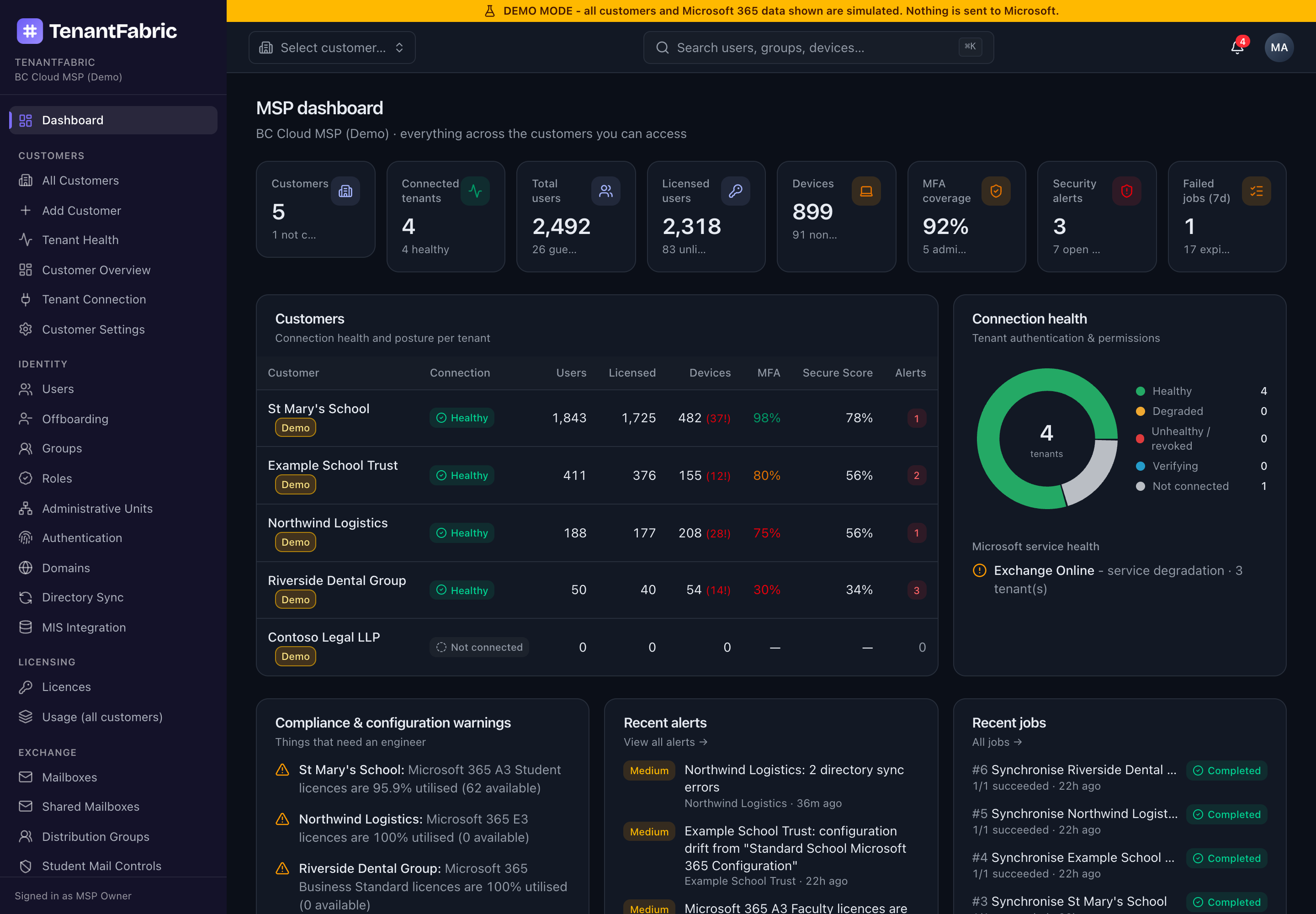
tenantfabric.com/dashboard
TenantFabric MSP dashboard showing every customer tenant's posture
Built for the people who manage Microsoft 365 for a living:
Managed service providers·Multi-academy trusts·Independent schools·IT consultancies
The problem

Managing many tenants shouldn't mean many tabs.

01

Scattered admin centres

Entra, Intune, Exchange, Teams, Purview - multiplied by every school you manage. Context-switching all day, every day.

02

No single source of truth

Which devices are non-compliant? Who's missing MFA? Which tenant's connection is degraded? The answer lives in ten different portals.

03

The help desk leaks

Passwords pasted into chats, callers verified on a hunch, and - in schools - staff and students needing different rules entirely. The safe way is the slow way, so it gets skipped.

The platform

One portal. Every tenant. The whole estate.

TenantFabric connects to each customer's Microsoft 365 through the Graph API and gives your engineers one consistent interface for the work that used to mean a dozen logins.

Every tenant, one view

A live MSP dashboard and cross-tenant fleet overview: connection health, users, licences, devices, MFA coverage, Secure Score and open alerts - per customer, at a glance.

  • MSP dashboard
  • Tenant health
  • Fleet overview
  • Cross-tenant reports

Intune & endpoint depth

Device reporting that tells you which machines need an engineer - compliance, Autopilot health, Windows Hello, update and security-policy coverage, app deployment, all honestly computed.

  • Autopilot
  • Windows Hello
  • Update coverage
  • Security coverage

Security & response

Secure Score and Defender posture, Conditional Access, risky users, breach detection and phishing response built in - with critical events pushed to Teams and raised as tickets in your existing PSA or helpdesk automatically.

  • Conditional Access
  • Breach detection
  • Defender XDR
  • Teams alerts

Automation & governance

Scheduled automations, bulk jobs, configuration-drift detection against your house baseline, tenant comparison, and a full audit trail of who changed what, where.

  • Automations
  • Drift detection
  • Audit log
  • Exports (CSV/XLSX/PDF)
Security & Defender

Catch the breach. Close the gap. Prove it.

TenantFabric turns Microsoft's security stack into one managed service across every customer: it watches for compromise, tells you what to do about it, and keeps each tenant from quietly drifting away from your baseline.

Breach detection, built in

A scheduled sweep of every tenant looks for risky users, Defender alerts, new OAuth app consents and fresh admin grants - de-duplicated into one alert queue with one-click remediation and suggested next steps.

  • Risky users
  • Illicit consents
  • Admin grants
  • One-click response

Foreign sign-in & admin-role watch

Spot sign-ins from outside your expected countries and new assignments to privileged roles such as Global Administrator. Optionally - per customer, never by default - auto-block the account while you investigate.

  • Foreign sign-ins
  • New Global Admins
  • Opt-in auto-block
  • Per-role rules

Defender XDR, in one place

Correlated incidents across endpoint, email, identity and cloud apps. Triage, classify, assign and comment without leaving TenantFabric, see the evidence, and isolate an affected device straight from the incident.

  • Incident triage
  • Alert evidence
  • Isolate from incident
  • Cross-tenant queue

Advanced hunting & custom detections

Run read-only KQL across your Defender data with ready-made hunting queries, then turn the good ones into scheduled custom detection rules from templates - each test-run before it is created.

  • KQL hunting
  • Detection templates
  • Scheduled rules
  • CSV export

Defender for Endpoint

Device risk, exposure score, secure-configuration score, discovered CVEs and vulnerability recommendations per customer, with device response actions - antivirus scan, isolate and release - gated by permission and audited.

  • Exposure score
  • CVEs
  • Device isolation
  • AV scan

Secure Score you can trend

Microsoft keeps about 90 days; TenantFabric keeps it going. Track each tenant daily, see who is improving and who is slipping across the fleet, and work the improvement actions per customer.

  • Daily history
  • Fleet ranking
  • Improvement actions
  • Defender baselines

Config backup & rollback

Snapshot each tenant's security configuration - Conditional Access, policies and settings - and roll back a change that went wrong, with the difference shown before anything is written.

  • Config snapshots
  • Diff before restore
  • Audited rollback

Config deviation monitoring

Define the house baseline once - including Defender for Office 365, Defender for Endpoint and Entra checks - and get alerted when a tenant drifts from it, with a suggested fix and optional one-click remediation.

  • Best-practice baselines
  • Drift alerts
  • Posture monitoring
  • Suggested fixes

Detect and advise by default; act only when you say so. Automatic blocking is opt-in per customer, every response action is permission-gated and audited, and nothing is invented - where Microsoft doesn't expose data, TenantFabric says so. How we handle your data.

Help-desk superpowers

The safe way, made the fast way.

The day-to-day of a service desk is where tenants quietly get less secure. TenantFabric builds the secure habit straight into the one-click action - so your engineers never have to choose between doing it right and doing it now.

Passwords that never touch a chat

Reset a password and hand it over as a Password Pusher one-time link instead of plain text. It self-destructs after one view or on a timer, and the password is never written to chat, email or the audit log.

  • Password Pusher
  • One-time links
  • Nothing in plain text

Know who's really calling

Before you touch a caller's account, TenantFabric sends a Microsoft Authenticator push challenge to the user's own device. If they approve it, they've proven they are who they say they are - no more "verifying" on a hunch or a date of birth.

  • Authenticator push challenge
  • Verified on the user's device
  • Audited caller checks

Travel without a lockout

When a user travels outside your UK geolock, grant a time-boxed Conditional Access bypass from their profile in one click - it expires on its own, so the geofence snaps back without anyone remembering to undo it.

  • Geolock bypass
  • Auto-expiring
  • Per-user, audited

Incidents raise themselves

Critical events - a new Global Admin, a phishing hit, a degraded tenant - are pushed to Microsoft Teams and opened as tickets in your existing PSA / helpdesk automatically, so nothing important waits for someone to notice it.

  • Teams alerts
  • PSA & helpdesk tickets
  • Auto-raised & updated

Every one of these is confirmed and audited. Outward-facing and destructive actions ask before they run, record who did what, and are scoped to the customers an engineer is allowed to touch.

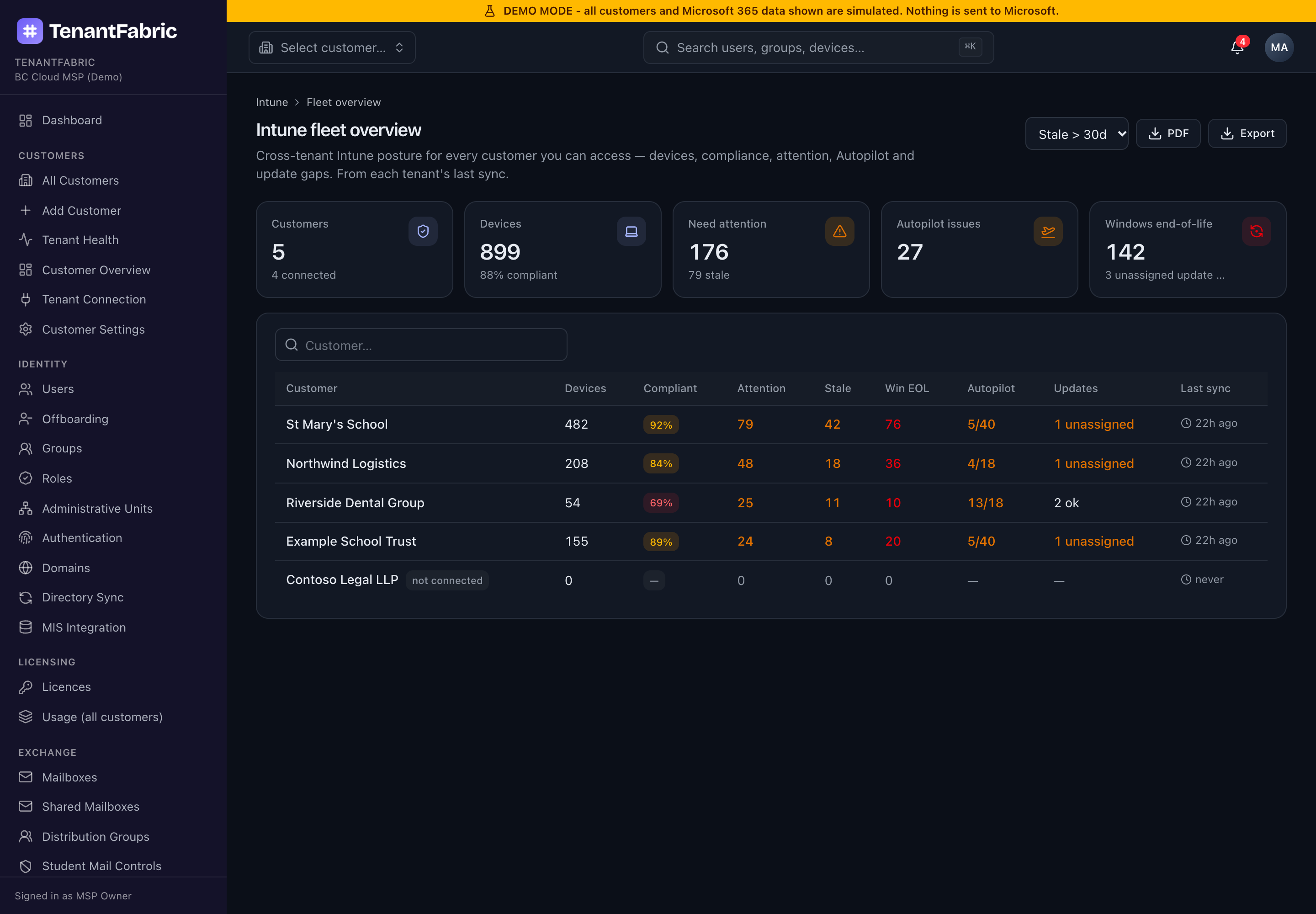
TenantFabric fleet overview across customers
For MSPs

Worst-first, across the whole estate.

The fleet overview ranks every customer by what needs attention - devices, compliance, stale endpoints, Autopilot issues, Windows end-of-life - and drills straight into the tenant that needs you. One PDF is a board-ready estate report.

  • Every customer's posture on one screen
  • Click a row to jump into that tenant
  • Export the estate to PDF or Excel in a click
Solutions

Find the part of TenantFabric that fits your work.

For MSPs

One multi-tenant portal for identity, licensing, Intune, security and automation across every customer.

For schools and trusts

Staff and student cohorts, MIS sync, class provisioning and student mail controls across one school or a whole trust.

Breach detection

Risky users, foreign sign-ins, new admin roles and Defender incidents in one queue, with opt-in auto-block.

Two editions

Pick the edition that fits your customers.

Same platform, same engine, same honest-by-design reporting. Education simply adds the school-specific layer on top - so a commercial MSP isn't paying for cohorts and MIS it will never use.

For commercial MSPs

TenantFabric Business

The full multi-tenant command centre for MSPs, consultancies and in-house IT running Microsoft 365 for commercial customers.

  • MSP dashboard & cross-tenant fleet overview
  • Users, groups, roles, licensing & lifecycle
  • Intune depth - compliance, Autopilot, updates, app & security-policy coverage
  • Security & response - breach detection, Defender XDR incidents & hunting, Defender for Endpoint, Secure Score trending, Conditional Access, mail investigation
  • Config backup & rollback and configuration-deviation monitoring
  • Help-desk tooling - Password Pusher, MFA push identity verification, travel bypass
  • Teams alerts & integration with your existing PSA / helpdesk
  • Automation, configuration-drift detection & full audit trail
For schools & trusts

TenantFabric Education

Everything in Business, plus the layer that understands how a school actually runs.

Everything in Business, plus:

  • Staff / student cohorts, auto-classified from group names
  • MIS sync - Arbor, Bromcom, ScholarPack and SIMS
  • Class Teams, email groups & security groups provisioned from the MIS
  • Student mail controls - block external, student-to-student & distribution lists
  • Per-cohort Windows Hello & Autopilot (on for staff, off for students)
  • Teams-policy monitoring per cohort
What's different: the Business edition leaves out the education-only features - cohorts, student mail controls, MIS integrations and class provisioning. Everything else is identical, and a Business customer can move up to Education at any time.
TenantFabric for Education

It knows the difference between staff and students.

The Education edition adds everything a school needs on top of the core platform: it classifies users into cohorts from your group names, syncs your MIS, and applies the right policy to the right people - automatically.

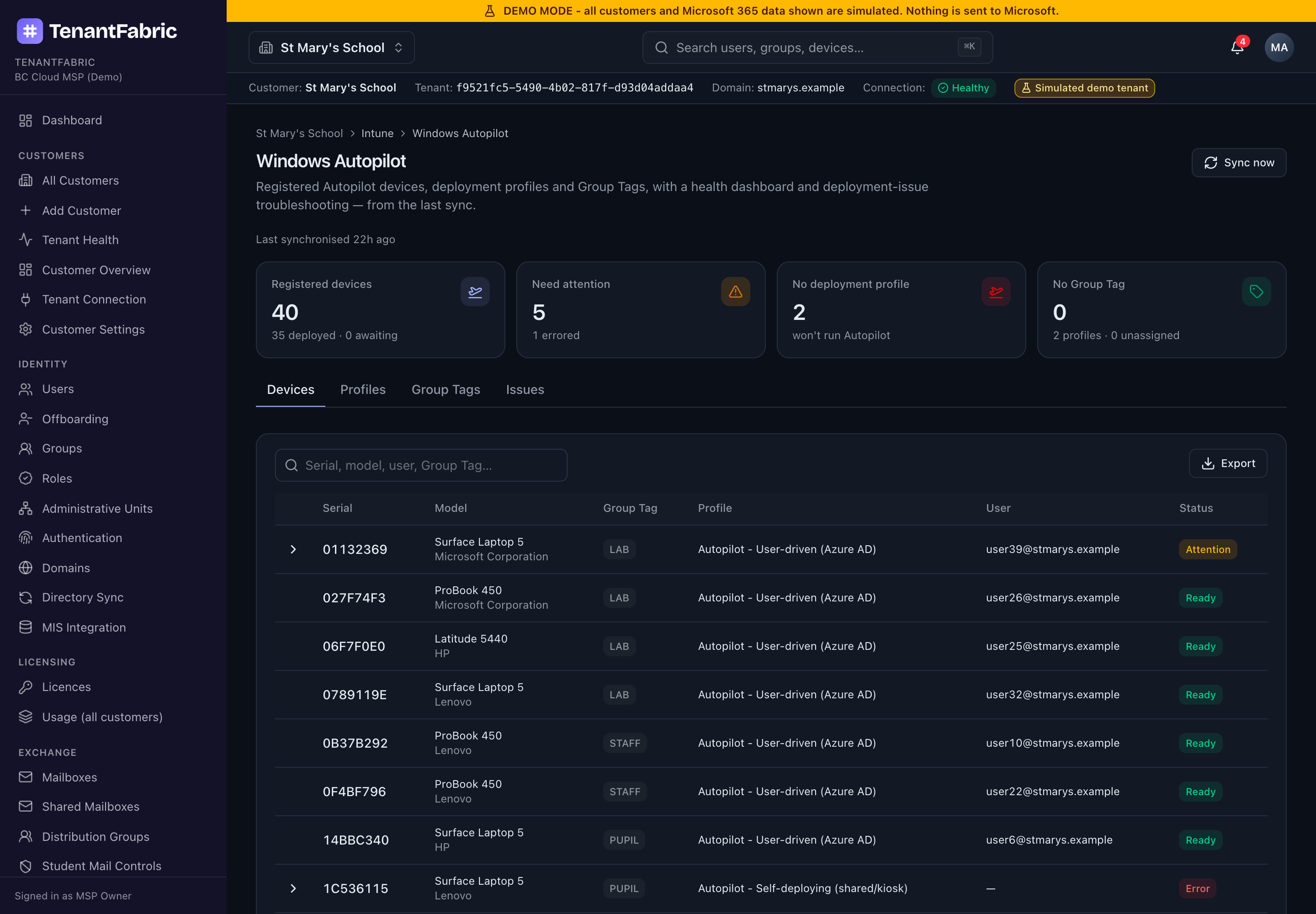
TenantFabric Windows Autopilot and cohort controls

Cohorts, MIS and class provisioning

Connect Arbor, Bromcom or ScholarPack (and SIMS via an aggregator), and TenantFabric pulls staff, students and classes - then shows a dry-run plan of the security groups, email groups and class Teams it would create, before anything is written.

  • Staff / student badges auto-detected from groups
  • Windows Hello on for staff, off for students - per cohort
  • Student mail controls: block external, student-to-student, distribution lists
  • Provision class Teams & groups from the MIS, with a preview first
Arbor

Direct REST sync of staff, students and teaching groups.

Bromcom · ScholarPack

Native adapters for the MIS your schools already run.

SIMS

Reached cleanly through a data aggregator - no fragile workarounds.

How it works

Live in an afternoon, not a quarter.

Connect

Onboard a customer and consent least-privilege Graph access - app-only or GDAP. TenantFabric verifies exactly what was granted.

Sync

A background sync caches each tenant's users, devices, licences, policies and groups, so every page loads instantly.

See & act

Report across the estate, fix what needs fixing, and run changes with a confirmation - every action audited.

Automate

Schedule checks, push critical alerts to Teams and your existing PSA / helpdesk, and keep tenants aligned to your baseline.

Why TenantFabric

Honest by design.

Reporting reads from a cached snapshot and tells you when data was last refreshed. Where Microsoft Graph can't answer a question, TenantFabric says so - it never invents data to fill a gap. Every change is confirmed, scoped to the customers you're allowed to touch, and written to the audit log.

1×
portal for every tenant you manage
50+
management surfaces, unified
0
invented numbers - Graph limits shown honestly
100%
of changes confirmed & audited
FAQ

Frequently asked questions

What is TenantFabric?

A multi-tenant Microsoft 365 management platform for MSPs, IT consultancies, multi-academy trusts and schools. It connects to each customer's Microsoft 365 through Microsoft Graph and gives engineers one portal for identity, Intune, security, help-desk tooling and automation.

Is TenantFabric an alternative to CIPP?

For MSPs who want a commercial, vendor-supported portal, yes. CIPP is a respected open-source project for managing Microsoft 365 across tenants. TenantFabric covers similar day-to-day ground and adds built-in breach detection, a Defender XDR workspace and an Education edition. See our CIPP alternative page for a fair comparison.

How does TenantFabric compare with Microsoft 365 Lighthouse?

Lighthouse is Microsoft's free portal for eligible CSP partners managing SMB customers, and it is a good option if it covers your needs. TenantFabric is a commercial portal that adds help-desk tooling, breach detection with response, a Defender XDR workspace and an Education edition, and it can connect through app-only consent without the CSP programme. They can run side by side. See our Lighthouse alternative page.

Is TenantFabric an alternative to Octiga?

For MSPs who want management and security in one portal, yes. Octiga is a focused Microsoft 365 security platform for MSPs. TenantFabric offers baselines, breach detection and response too, and adds day-to-day management, help-desk tooling and an Education edition. See our Octiga alternative page.

Who is TenantFabric for?

Managed service providers and IT consultancies managing Microsoft 365 for several customers, and trusts and schools that run one or many tenants. There is a Business edition for commercial customers and an Education edition that adds cohorts, MIS sync and class provisioning.

Does TenantFabric store our data?

TenantFabric reads from your own Microsoft 365 through Microsoft Graph and keeps a cached working copy of directory and device information so pages load quickly. It does not read email content, OneDrive or SharePoint files, or Teams chats, and Microsoft remains the source of truth. Our security and privacy page sets out exactly what is held and what is never touched.

How do you connect a customer?

Through GDAP or an app-only registration that the customer consents to. Access is least-privilege, per module, and TenantFabric verifies what was granted. The customer can revoke access at any time in their own Microsoft Entra.

Does it need an agent or anything installed on devices?

No. TenantFabric works entirely through Microsoft's APIs, so there is nothing to install on customer devices or servers.

Which Microsoft licences are required?

Core management works with standard Microsoft 365 tenants. Features that rely on a Microsoft product, such as Intune reporting, Entra ID Protection or Microsoft Defender, need that product licensed in the customer tenant, and TenantFabric tells you when something is unavailable.

Does it work with our PSA or helpdesk?

Yes. Critical events can be raised as tickets in your existing PSA or helpdesk and sent to Microsoft Teams, so nothing important waits for someone to notice it.

How is security handled?

Secrets are encrypted at rest, each organisation's data is isolated at the database level, engineers only see the customers they are assigned, and every change is recorded in an audit trail. Automatic responses such as blocking an account are opt-in per customer.

How much does it cost, and can I see it first?

Get in touch for pricing and a demonstration. We are happy to run it against a test tenant so you can see it working before you decide.
Proof of concept available now

See TenantFabric on your tenants.

Book a walkthrough and we'll show you your own estate in TenantFabric - multi-tenant reporting, Intune, security and MIS, in one place.

Get started at tenantfabric.com · hello@tenantfabric.com